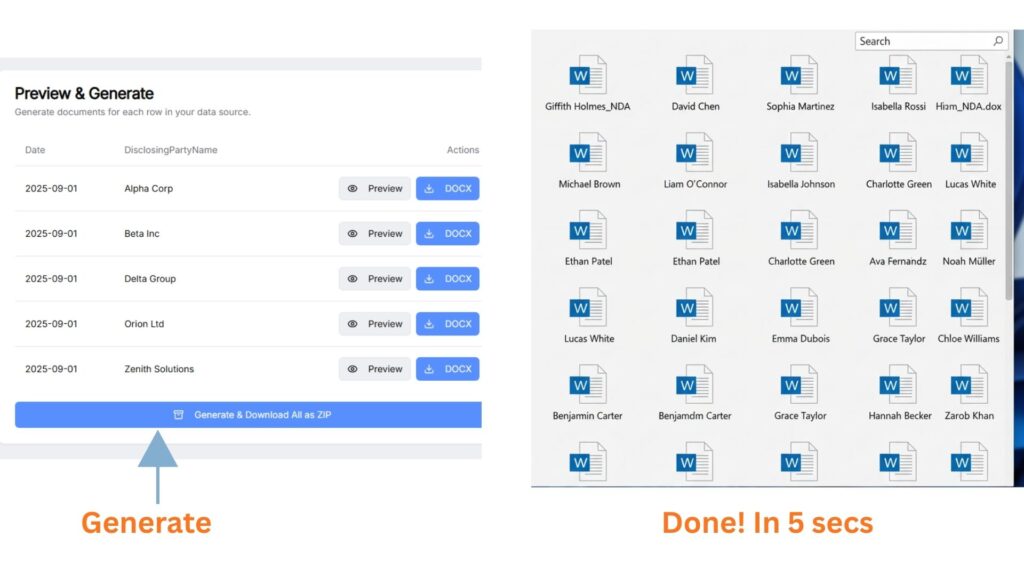
Generate Word Documents at Scale, Without Fixing Spreadsheets or Storing Your Data
DocuPriv separates spreadsheet logic from Word templates and lets you choose exactly how data should appear — names, brackets, symbols, numbers — applied exactly as selected.
No AI interpretation. No nested IF logic. No document storage.
If This Looks Familiar…
Nested IF statements inside Word
Spreadsheet values like
2.5M, $2,500,000, 0 (Transfer)
Internal notes sitting next to client-facing fields
Manual review of every merged document “just in case”
That moment before sending where you double-check everything
You’re not doing it wrong.
You’re forcing a text editor to behave like a rules engine.
And that’s where fragility begins.

Word Edits Text
It Doesn’t Normalize Data.
Mail merge assumes your spreadsheet is clean.
Real spreadsheets aren’t.
So professionals build defensive logic:
Nested IF statements
FIND functions
Formatting switches
Conditional workarounds
Over time, your template becomes a fragile decision tree.
It works — until one value breaks it.
And then nobody trusts the output.
Separate Logic From Documents
DocuPriv keeps your Word template clean.
All data normalization and transformation happens outside the document, explicitly defined and fully deterministic.
Convert
2.5Mto$2,500,000Convert
0 (Transfer)toNILStrip internal markers like
(URGENT!)Enforce consistent formatting rules
Map inconsistent spreadsheet columns safely
You define the rules once.
Every output follows them exactly.
No hidden behavior.
No interpretation.
No guessing.
Your Client Data Is Not a Training Set.
DocuPriv does not use large language models.
There is no probabilistic interpretation of your documents.
No AI deciding what you “meant.”
No model learning from your clients’ data.
Processing is deterministic.
Input → Defined Rules → Output.
That’s it.
For firms that care about control, that distinction matters.
We Don’t Store Your Spreadsheet
We Don’t Store Your Templates
Your Word template stays yours.
Your spreadsheet stays yours.
Output goes directly to your local download or your Google Drive.
No document warehouse.
No training pipelines.
No silent replication.
You retain control of your data.
⚡Generate dozens or hundreds of Word documents
Generate those many tedious documents instantly and perfectly.
🗂️ Stay compliant with sensitive data
Keep data privacy intact, we don’t keep your data
🔒 Trust the output without checking every page
Avoid embarrassments and costly mistakes
☁️ You control where files go
Download locally or click “Save to Drive” — nothing is stored on our servers unless you explicitly save it.
BEFORE
Tedious Manual Method taking hours
AFTER
Secure. Private. Built for Fast Document Generation.
Zero Data Stored
We never save your documents. Everything stays in your Drive or your local computer.
Privacy By Design
Manual export only (to local computer and Google Drive). No auto-save. No hidden syncing.
Google Drive Integrated
Access to only the folder created by the app in your Google Drive. DocTree does not see beyond the app folder
Designed for Legal, HR, Real Estate & Finance
Fast, compliant document workflows your team can trust.
With DocuPriv:
Your Word template becomes simple again.
Your spreadsheet can stay imperfect.
Your team stops manually re-checking every page.
You stop holding your breath when generating documents.
You move from hope-based automation to deterministic control.
Why It’s Safer
Least-privilege Google Drive access
We only access the app folder we create, never your entire Drive.
In-memory processing
Documents are generated in memory; no intermediate, permanent or temporary storage on our servers.
Manual save only
Files are only written to your Google Drive or local computer when you choose to save them.
Don’t Take Our Word for It.
Upload your real spreadsheet.
Use your real Word template.
Generate 25 documents free.
Not a feature tour.
Not a demo sandbox.
A real proof test using your real data.
If the preview is correct, the output is correct.
If Your Mail Merge Feels Fragile, It Probably Is.
You don’t need more nested IF logic.
You need separation of concerns.
🎯 Who It’s Perfect For
Law Firms
NDA & contracts
HR Teams
Bulk onboarding docs
Agencies & SMBs
Juggling repeat agreements
Consultants
handling contracts across multiple clients